Mobs
Mobs are the #1 cause of lag on the server. Every entity the server has to track — pathfinding, AI ticks, collision — costs performance. Managing your mobs well is the single biggest thing you can do to help.
Villagers
Villagers are especially expensive because of their complex AI. Cull breeders regularly — don't let populations grow unchecked. Avoid infinite breeder designs unless they are food-limited. Keep your working villager counts as low as practical.
Turtles
Keep just one breeding pair. Turtles become fertile again immediately after laying eggs, so a single pair is all you need.
Pigs
Pigs are not recommended. They drop the same items as cows but have no secondary product. Use cows instead and skip the extra entities.
Vanilla Pets
Avoid keeping excessive numbers of vanilla pets (wolves, cats, parrots, etc.). Each one is a tracked entity with AI. A few companions are fine — a small army is not.
Important: Never circumvent the entity cramming gamerule. Designs that work around it will be removed.
FarmLimiter Plugin
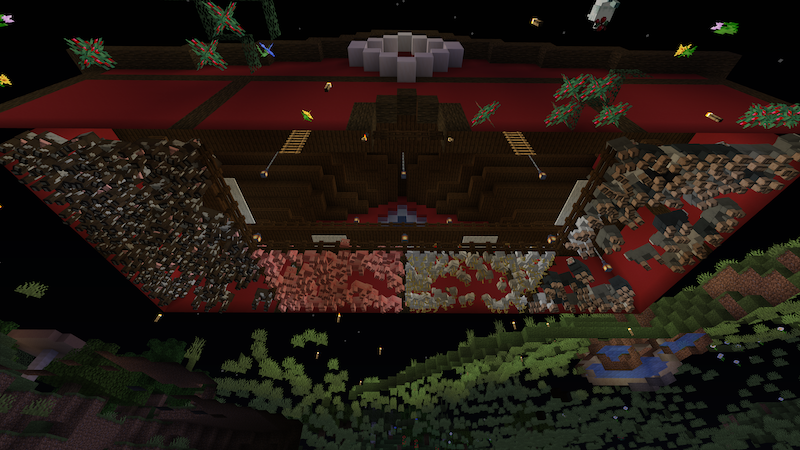
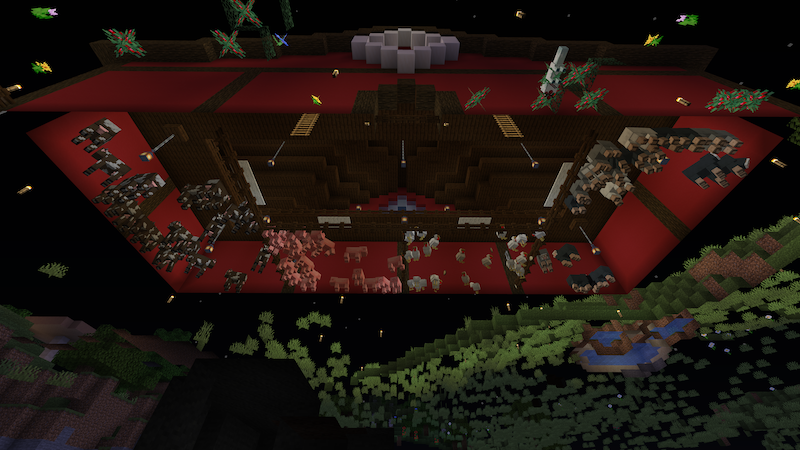
We use the FarmLimiter plugin to enforce mob density caps. When a chunk exceeds a limit, unnamed mobs over the cap are randomly removed. Named mobs (via nametags) are protected and will not be culled.
Before
After
Hard Caps
Tip: Keep at least 50 blocks of distance between your keeper villagers and any breeder. This prevents the breeder from accidentally pushing your named villagers over the density cap in the same area.
Minecarts
Minecarts cause substantial lag because each one is a moving entity the server has to track every tick. Even stationary minecarts still have physics calculations running.
No Long-Term Mob Storage
Don't store mobs in minecarts for extended periods. A mob inside a minecart is two entities instead of one, and the minecart prevents the mob from being affected by entity cramming.
Avoid Hopper Minecart Designs
Hopper minecart farm designs are especially costly. They combine moving-entity lag with item-scanning lag. Use regular hoppers or water streams instead.
Killing Chambers
Limit entity-cramming killing chambers to one per farm. Multiple killing points means more mobs alive at once waiting to be processed.
Hoppers
Hoppers are deceptively expensive. Every hopper checks for items above it every game tick, even when completely empty. A wall of hoppers is a wall of constant calculations.
Vertical Lines
When moving items downward, alternate vertical hopper lines with single chests in between. This cuts the number of hoppers (and per-tick checks) roughly in half.
Bulk Storage
Avoid bulk storage systems that drop random items onto hopper grids. Each loose item on the ground is an entity, and each hopper below is scanning for it.
Long-Distance Transport
Use water streams instead of hopper chains for moving items over long distances. A single water stream replaces dozens of hoppers.
Myth: Placing droppers on top of hoppers does NOT reduce lag. The hopper still checks for items every tick regardless.
Water stream cautions:
- Disable pet item pickup near water streams so pets don't steal transported items.
- Make sure water flows don't push items into unloaded chunks.
- Destroy excess items you don't need rather than letting them accumulate.
Redstone
Redstone machines fire block updates across wide areas. The more components updating simultaneously, the heavier the load. Efficient redstone is lag-friendly redstone.
Right-Size Your Farms
Build farms to match what you actually need. A mega-farm running 24/7 that fills chests you never empty is wasted server resources.
Sequence Piston Firing
Instead of firing all pistons simultaneously, stagger them with sequential timing. This spreads the block update load across multiple ticks.
Slimeblock Push Bars
Use slimeblock push bars where possible. One piston moving a slimeblock row can replace several individual pistons.
Disable When Not in Use
Add on/off switches to your machines and shut them down when you're done.
Auto-Dock Hopper Minecarts
If your design uses hopper minecarts, build an auto-docking system so they stop moving when not needed.
Tip: Redstone clocks should be need-based. Use daylight sensors, item detectors, or player proximity triggers rather than clocks that run constantly.
Other Entities
Block entities (tile entities) cause more lag than normal blocks. Everything in this category has extra data the server has to store and process per tick.
Signs
Signs with text on them are more expensive than empty signs. If you're using signs purely for waterlogging, leave them blank.
Item Frames
Item frames are entities, not blocks. Each one counts toward entity processing. Use sparingly.
Brewing Stands
Brewing stands cause unexpected lag because the server checks their inventory and state every tick, even when idle.
Dropped Items
Every loose item on the ground is a tracked entity with physics. Pick up items as you mine rather than leaving trails of drops behind you.
General rule of thumb: If you wouldn't want someone else's build causing the lag you're about to create, reconsider the design.